
Nested SPF records can use more of the lookup allowance depending on which service sends the email. A worked example shows what flattening changes.
The same SPF record can use one lookup for one sender and four for another. SPF checks the record in order, following any nested records it needs, and stops when it finds a match.
That matters near SPF’s ten-lookup limit. A successful check for one email service does not tell you how many lookups another will need.
Following the includes
Consider a domain using two email platforms, Alpha and Beta. Its SPF record checks Alpha first, then Beta.
Alpha lists its sending IP address directly. Beta points to two more records, Beta One and Beta Two, which each list a sending IP address. This example uses reserved addresses.
See the exact example records (technical details)
example.com
v=spf1 include:alpha.example.com include:beta.example.com -allalpha.example.com
v=spf1 ip4:192.0.2.10 -allbeta.example.com
v=spf1 include:beta-one.example.com include:beta-two.example.com -allbeta-one.example.com
v=spf1 ip4:198.51.100.20 -allbeta-two.example.com
v=spf1 ip4:203.0.113.30 -allEach include reached during the check uses one of SPF’s ten allowed lookups. Checking an ip4 entry does not use another. Reading the domain’s starting SPF record is outside that count. These are the SPF counting rules, rather than a count of every DNS request sent over the network.
Four senders, four paths through the same record
| Where the email comes from | SPF lookup count |
|---|---|
| Alpha: matches the first included record | 1 |
| Beta One: checks Alpha, Beta, then Beta One | 3 |
| Beta Two: checks Alpha, Beta, Beta One, then Beta Two | 4 |
| An unlisted address: checks all four includes, then fails | 4 |
For Alpha’s address, 192.0.2.10, the first include finds a match. SPF passes and stops. Nothing under Beta needs to be checked.
For Beta One’s address, 198.51.100.20, Alpha does not match. The check moves to Beta, then follows its first include to Beta One: three includes before a match.
Beta Two’s address, 203.0.113.30, also requires checking Beta One before reaching Beta Two. The total is four.
An unlisted address such as 192.0.2.200 goes through all four includes without a match. The domain’s final -all produces an SPF fail. The record is unchanged; the sending address determines how far the check goes. SPF evaluation rules
What flattening changes
SPF flattening replaces supported nested entries with the IP addresses or ranges they authorise.
In this example, a flattened record could list all three platform addresses directly. If the domain points to that hosted record through one include, all three services sit behind a single counted lookup.
Before flattening, the four example senders use one, three, four and four lookups. With that single include and the three IP entries inside it, each uses one. The unlisted address still fails; flattening has not added it to the allowed senders.
DNS is still needed to read the records. Other includes left in the domain’s SPF record would still count.
The flattened addresses also need to stay current. A static copy can become outdated when a provider changes its infrastructure. Emailmetry’s SPF flattening service automatically refreshes the resulting IP ranges behind a stable hosted include.
The same senders with fewer lookup steps
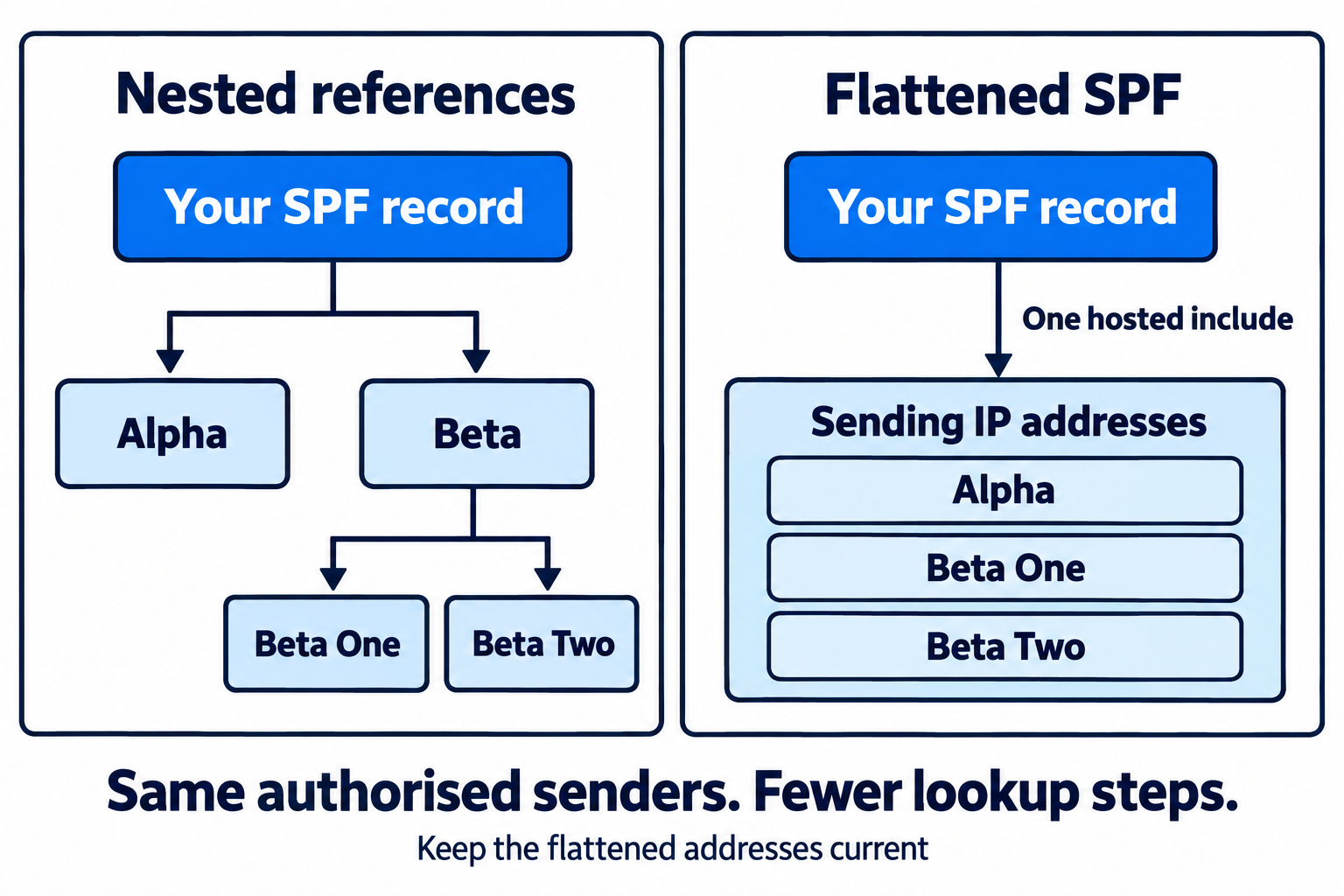
Read the diagram as text
- Original policy: one include references Alpha, and another references Beta. Beta contains includes for Beta One and Beta Two.
- Alpha, Beta One and Beta Two each authorise one sending IP address in this example.
- The flattened policy uses one hosted include containing those same three IP addresses directly.
- The example's counted lookup paths change from 1, 3, 4 and 4 to 1 each. The unlisted sender remains unauthorised.
- Other includes in a real policy still count; flattening does not eliminate DNS.
Compare counts that measure the same thing
A checker may report a total across the record’s references, while another result describes the path taken for one sending address. These answer different questions.
For this example, “Alpha uses one lookup” and “the record can use four lookups” are both true. Assessing the limit means accounting for the senders that travel further through the record too.
Use the SPF checker to inspect your own published references. If a sending path exceeds the limit, the lookup-limit guide explains how to investigate and verify a correction. The reserved records above illustrate the counting rules; querying their example names on the public internet will not reproduce them.